
1. Open the navigation information screen
- Start the navigation on your MG system.
- Open the navigation menu.
- Find and select About.
- Check the information displayed on the screen.
2. Identify your navigation provider
If you see "Telenav Terms and Conditions"
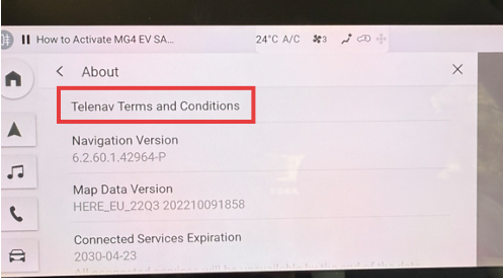
Your navigation system uses software provided by another company, and is not supported by Naviextras.
For information about available map updates, please contact an authorised MG dealership.
If you see "Naviextras" or "NNG Kft."
Your navigation system uses software provided by NNG.
However, not all MG navigation systems using NNG software can be updated through the Naviextras Toolbox.
To use the Toolbox, your navigation system must support the creation of a device fingerprint. This is a file containing information about your navigation system that allows the Toolbox to recognise it and offer compatible updates.
If your system does not allow you to generate a fingerprint, you cannot update its maps through the Toolbox, even if NNG provides the navigation software.
In this case, please contact an authorised MG dealership for information about available map updates.
3. What to do if your fingerprint is not recognised
If your MG navigation system allows you to generate a device fingerprint, but the Naviextras Toolbox does not recognise it, our support team can help investigate the issue.
Click the Contact us button at the top of the page for further assistance.
Please include:
- Your MG vehicle model and year
- A short description of the problem
- A screenshot of any error message displayed by the Toolbox, if available
4. Where to get help
The appropriate support channel depends on your navigation system:
- Navigation software provided by Telenav or another provider: Contact an authorised MG dealership.
- NNG navigation software, but fingerprint generation is not possible: Contact an authorised MG dealership for information about map updates.
- NNG navigation software, fingerprint generated but not recognised by the Toolbox: Contact Naviextras support using the Contact us button at the top of the page.