
1. Check whether a Factory Restore package is available
The backup option is not available for many Pioneer navigation systems, particularly those that use USB synchronisation technology.
These systems use a synchronisation process designed to protect navigation data and reduce the risk of data loss or corruption when transferring updates.
For certain Pioneer models, a Factory Restore package is available as an alternative way to restore the original navigation content.
Please note: The Factory Restore package is not available for every Pioneer model.
2. Find the Factory Restore package in the Toolbox
If your navigation system supports this feature, you can find the package in the Advanced installer.
- Connect your Pioneer navigation system or its update media to your computer.
- Open the Naviextras Toolbox.
- Wait for the Toolbox to recognise your system.
- Go to Device > More > Advanced.
- Look for the older map content listed as part of the original navigation package.
- Select the appropriate content and follow the on-screen instructions to install it.
The Factory Restore package is offered in the Toolbox in a similar way to other available map content.
3. How to identify the factory content
Factory map content is usually identified by an older map version than the updates currently available for your system.
For example:
- 2014Q2: Original factory map content
- 2016Q4: A newer map update
In this example, 2014Q2 represents the factory content that can be restored.
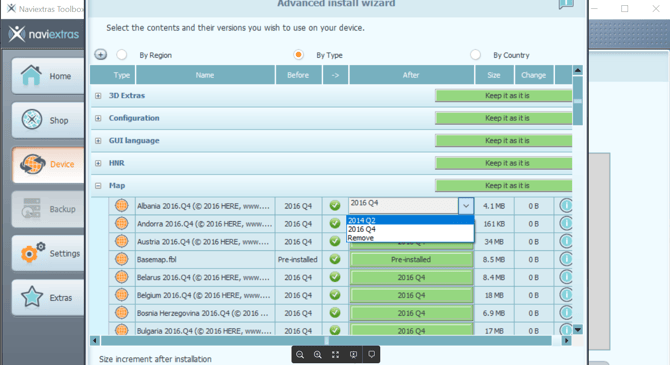
Important: These version numbers are examples only. The available factory content depends on your Pioneer model.
Need help?
If you cannot find a Factory Restore package or are unsure which content to select, click the Contact us button at the top of the page for further assistance.
Please include your Pioneer model and a screenshot of the available content in the Toolbox, if possible.